BackCountry Navigator PRO GPS v4.9.9


BackCountry Navigator PRO GPS
Required Android O/S : 1.6+

Use your phone or tablet as an offroad topo mapping GPS with the bestselling outdoor navigation app for Android! Explore beyond cell coverage for hiking, hunting and more.

Download topo maps for the US and some other countries in advance, so you won't need cell coverage when navigating.

This uses many publicly available map sources as free downloads. It also has some additional content available as an in app purchase:

  • Boundary maps for 12 western states from the Bureau of Land Management(BLM) for $7.99. Great for hunters, hikers, and prospectors. 
  • Content from US TrailMaps for $15.99, including:
  • Snowmobile Trail Maps for Snowmobiling enthusiasts, 
  • ATV Trail Maps 
  • Whitewater Trail Maps,
  • Equestrian Trail maps. 
See these in the menu under More-> "Purchasing AddOns".

You are welcome to try the DEMO version to make sure you like the maps in your country.

NOTE: If you've already purchased this or any paid app, you can install it at any time from 'My Apps' in the Android Market.

Use offline topo maps and GPS on hiking trails without cell service! The GPS in your Android phone can get its position from GPS satellites, and you don’t have to rely on your data plan to get maps. Have more fun and safe GPS adventures in the backcountry.

Preload offline topo maps, aerial photos, and road maps on your storage card, so they are ready when you need them for your GPS navigation. Many free map source are built into the app.

Add custom GPS waypoints in longitude and latitude, UTM or MGRS grid reference. Import GPS waypoints from GPX files. Choose mapsource-like icons for GPS waypoints. (This app uses the WGS84 datum, NAD27 is available in settings).
 

Use GPS for hunting a waypoint or geocache, for recording tracks and GPS waypoints on your trip, all the while tracking your GPS quest on topographic maps.

What's in this version : (Updated : Jun 21, 2013)
  • Changes to addon purchase hosting
  • Fixes for addon mishaps on some devices.
  • Accuterra Map Source available as a yearly subscription (for new subscribers).
  • New for Canada: Canada Base Map
  • Improved Share/Export dialog
  • Other fixes
  • Estimate size for download based on correct storage volume.
  • Addons include Accuterra map source, GMUs of various states. SnowMobile trail maps, ATV, Equestrian, Birding, and Whitewater trail maps, and BLM Land Boundary Maps of 12 western states.

SCREENSHOTS:


Read more »

Autorun Manager PRO v4.2.88


Autorun Manager PRO
Required Android O/S : 1.6+


Autorun Manager (formerly Autorun Killer) is an ultimate tool that lets you disable all the autostarting apps you don't need. Unfortunately this app is misunderstood many times so please read help carefully and/or mail the developer if you have questions.

There are many
 applications that automatically start when you turn on your device; many of these you don't use or need, they just consume your valuable resources. This app sports a basic mode for the regular users and an advanced mode for power users with rooted devices.

Autorun Manager in basic mode lets you manage
 applications that start up when you boot your device. Applications are terminated right after they start, but if the application is programmed to restart itself this can fail. Please note that someapplications are written so that they cannot be stopped because of the android system design. These kind ofapplications are marked as 'self-restarter' and are better to be left enabled.

In advanced mode you gain control over all the system-wide events and enable-disable application starts. This is the ultimate solution to control what you want to be started, but you also can break apps, so this feature is only for experienced users with rooted devices.

PRO features:

  • no ads
  • basic mode's prevent restart feature is selectable 
  • can block more than 4 receivers in advanced mode
  • Chuck Norris mode enabled
What's in this version : (Updated : Jun 25, 2013)

  • improved offline donator mode handling
  • more apps discovered
  • more info dialog shows install and update dates
  • some dialog fixes
  • updated libraries

SCREENSHOTS :


Instructions :
  1. Uninstall Autorun Manager free app (If you have already installed the free version)
  2. Copy 3 files in Autorun Manager PRO v2.0.1 TB RAR to Titaniumbackup folder > Restore 'App+Data'
  3. Run Autorun Manager PRO Key app
  4. Install Autorun Manager APK > Run
Read more »

Automatic Call Recorder Pro 3.52


Automatic Call Recorder Pro
Required Android O/S : 2.1+

In this ad free pro version you can automatically save calls from a contact and add comment to a recorded call.
You can also stop a recording in progress or start recording when a call is in progress.
Record all desired calls on your phone.
Select which calls to record:

You can record all calls or only those that are from numbers that are not in your contacts.

You can play, save and share the recorded calls.

Please note that on some
 devices recording a call is no possible so please try the free version first. 
Auto call recorder also supports wav , ANR, 3gp formats.
 
Recording on an external sd card or any location desired is also possible.
 
The audio source is now configurable.
 
For playing the 3gp format you can use the "MX Video Player".
 

If you have a problem with the recording, please try to record with a different audio source,
 
which you can configure in the settings tab.
Try to record with speaker on or off , until you find the best combination for your phone.
 
For example you can try Audio Source -> Voice UpLink and speaker off.

What's in this version: (Updated : Jun 24, 2013)
  • Support for additional languages - You can change languages in the settings
  • Bug fixes
  • In previous versions:
  • Show the call subject in the list of recordings - turn on this feature in the settings
  • Search by subject
  • Improved integration with Dropbox


Read more »

AutoKiller Memory Optimizer PRO v8.5.188


AutoKiller Memory Optimizer PRO
Required Android O/S : 1.6+

AutoKiller
 Memory Optimizer is not a regular task manager, it is an award winner minfree tweaker, it fine tunes android systems inner memory manager to keep your device fast over time. As a side effect it also lowers battery consumption. Also includes a manual process/service manager.

  • ROOT REQUIRED to set minfree values, unrooted devices will not have this feature
  • if you have questions or you face errors please check home page or write a mail
  • for more details see home page
Pro Features:

  • no ads
  • Chuck Norris mode enabled
  • apply kernel tweaks on boot
  • alternate preset (while screen is off)
  • all widgets
  • quick restart 
  • memory reclaim
Please be careful, apps with very similar look and name are distributed, they can be malicious.


What's in this version : (Updated : Jun 25, 2013)

  • improved offline donator mode handling
  • updated libraries
  • better PRO license handling
  • updated translations
  • deprecated pull to refresh
  • lots of fixes
  • new version coding schema
SCREENSHOTS:


Read more »

AppMonster Pro Backup Restore v2.7.2


AppMonster Pro Backup Restore 
Required Android O/S : 1.6+

AppMonster is an
 Application Manager for Android.
With AppMonster you can easily manage your apps. Enjoy features like
 backup, restore, uninstall, install from SD card, share and much more.
Simple, light user interface and stability.

Let the AppMonster support you after phone
 reset or switch to a new phone. With backup of Market-Links you'll get your apps back and update-notifications from Market as well.

You don't need to root
 your phone, AppMonster works without root.

Features:

  • Automatic (silent) backup on new app installations
  • Backup apps to SD card
  • Restore apps from SD card
  • Backup/restore .apk-files or Market-Links
  • Batch restore from SD card or from Market
  • Quick uninstalling 
  • Sort your apps by install-date, name, size
  • Display apps with Ads (AdMob) 
  • Multiple version backup 
  • Access to extended options like APP2SD, cache, permissions
  • Scan SD card for install-files (.apk-files)
  • Share app-links via Facebook, Twitter, eMail
  • Send backed up apps (.apk-files) by eMail, Dropbox or what ever
What's in this version : (Updated : Jul 21, 2013)

  • uninstall previous version first!
  • bugfix for plain (old) style backup
  • bugfix for sorting order
  • status "already backed up" is back
  • bugfixes for 2.7.0 (no backups, icon etc.)


Read more »

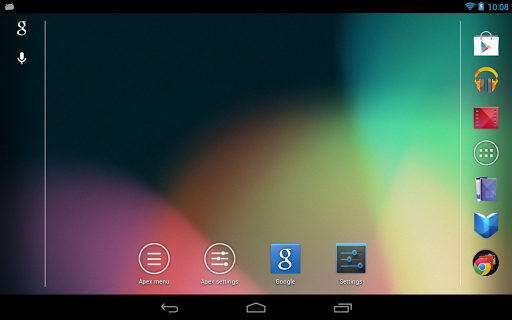
Apex Launcher Pro v2.0.3


Apex Launcher Pro
Required Android O/S : 4.0+

Powerful, fast, and highly customizable home replacement for
 Android 4.0+.
Apex Launcher helps you create a customized homescreen experience on your Ice Cream Sandwich (Android 4.0) device.

Features:

  • Customizable homescreen grid size and up to 9 homescreens
  • Scrollable dock with up to 7 icons per page and up to 5 pages
  • Infinite & elastic scrolling (homescreen, drawer and dock)
  • Fancy transition effects (tablet, cube, etc.)
  • Hide elements as you want (persistent search bar, status bar, or even the dock)
  • Customizable icons and labels for shortcuts and folders
  • Choose different folder preview styles and background
  • Multiple drawer styles (transparent/opaque, horizontal/vertical, paginated/continuous)
  • Drawer apps sorting (title, install date, mostly used)
  • Hide apps from the drawer
  • Lock your desktop to prevent accidental changes
  • Enjoy homescreen gestures (pinch, swipe up/down, double tap)
  • Advanced theme engine (icon packs, skins, etc.)
  • Backup/restore settings and data
  • Optimized for both phones and tablets
  • Lots of other customization options!
Pro Features:

  • Multiple configurable drawer tabs
  • Unread count notifications
  • Dock swipe gestures
  • Two finger gestures
  • More transition effects
  • ADW, LauncherPro, and Go Launcher theme support
  • Batch add option for folders
  • Option to merge folder contents
  • Widgets in dock (1x1 only)
  • Overlapping widgets
  •  More features on the way!

NOTE:

Due to limitations of the Android framework, you won't be able to add widgets from the app drawer without root access. If your device is rooted, please enable the Root Helper via Settings > Advanced settings > Enable Root Helper.

Tips:
  • Pinch the screen to access screen previews (like Exposé or HTC Sense).
  • Long press an icon to drag and drop it over another one to create a folder.
  • Long press icons/folders on the desktop and choose edit from the popup menu to customize icons and labels.
  • Drag, hover, and drop app icons over the delete button at the top of the screen to quickly uninstall apps.
  • Long press an app in the hide apps list to quickly launch that app.
  • Switch to single screen wallpaper mode to fix wallpaper zooming issues.
  • Enable the Root Helper in advanced settings (root required) to add widgets from the drawer.
What's in this version : (Updated : Jun 21, 2013)
  • Transparent status bar for Galaxy S4
  • Improved theme support
  • Misc fixes and optimizations
  • Updated translations
SCREENSHOTS:


Read more »

Bounty Hunter: Black Dawn v1.01


Bounty Hunter: Black Dawn
Required Android O/S : 2.2+

A total of 4 classes with more than 100 skills and numerous random attribute equipment drops are at your disposal.
Fight through
 large maps, challenging quests, and online multiplayer system.
Come and join the adventure team on the Muspel Planet!

Classes and Skills:
* Four classes with unique
 characteristics
* Eight adventurers with different backgrounds
* Customable diverse game styles
* Hundreds of skills and numerous
 combinations

Long Adventure:
* Great scenery in complex maps that are fun to explore
* Immersive principal narrative with comical branch stories
* Amusing plot focused task contents develop gradually to keep the story novel.
* Brutally challenging levels.

Teamwork:
* 4 persons co-op
* 8 persons PVP
* Team task mode will help you upgrade rapidly.
* Earn victory in Teamwork arena.
* Strategic team dynamics.

Weapon List:
* Various elemental weapons affect enemies differently.
* Randomly generated weapon drop system guarantees satisfying combat.
* Seven categories of weapons to obliterate varied battlefields.

Fight against Boss
* Epic fight scenes
* Powerful Boss will
 rock your survival skills.
* Designed for unique encounters each boss fight.

SCREENSHOTS:


Instructions :
  • Install APK
  • Copy 'com.ifreyrgames.blackdawn' folder to 'sdcard/Android/Obb/'
  • Launch the game


                                      Download apk                              Download obb
        
Read more »